TomoJAX
Parallel-beam, laminography and cone-beam CT reconstruction and alignment in JAX.
Reconstruct parallel-beam tomography, laminography and lab cone-beam CT with JAX. TomoJAX
provides differentiable projectors, fast FBP and iterative reconstruction,
joint volume-and-pose alignment, and a CLI for taking NXtomo, APS Data
Exchange, Nikon .xtekct or TIFF data through correction, reconstruction, and
slice export.
TomoJAX is an early research library. Its strongest fit is scientists who need
control over geometry and differentiation in a Python workflow. Synchrotron
geometries use parallel rays; lab scans use a point source and flat detector
(ConeGeometry), reconstructed with FDK or the iterative solvers. Alignment
needs scan-specific validation. See the
support matrix and known limitations
before choosing it for an experiment. The documentation is at
tomojax.dev.
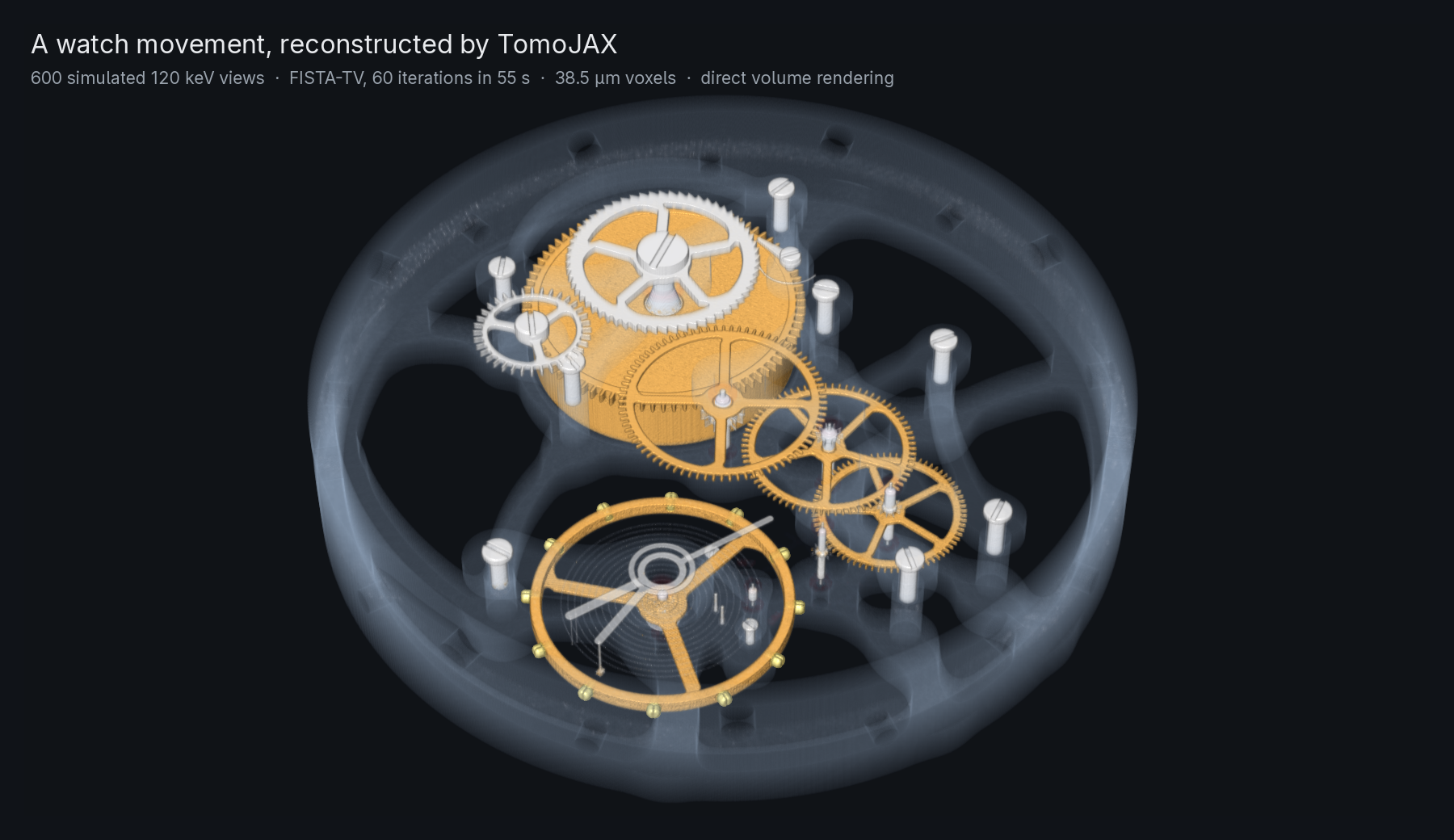
A 29 mm mechanical watch movement, scanned in simulation with 600 views of a 120 keV parallel beam, reconstructed with FISTA-TV on 38.5 µm voxels in 55 s on a laptop GPU and drawn by direct volume rendering. The projections are traced through the movement's Blender meshes by gVXR, not made by TomoJAX's projector. Reproduce it.
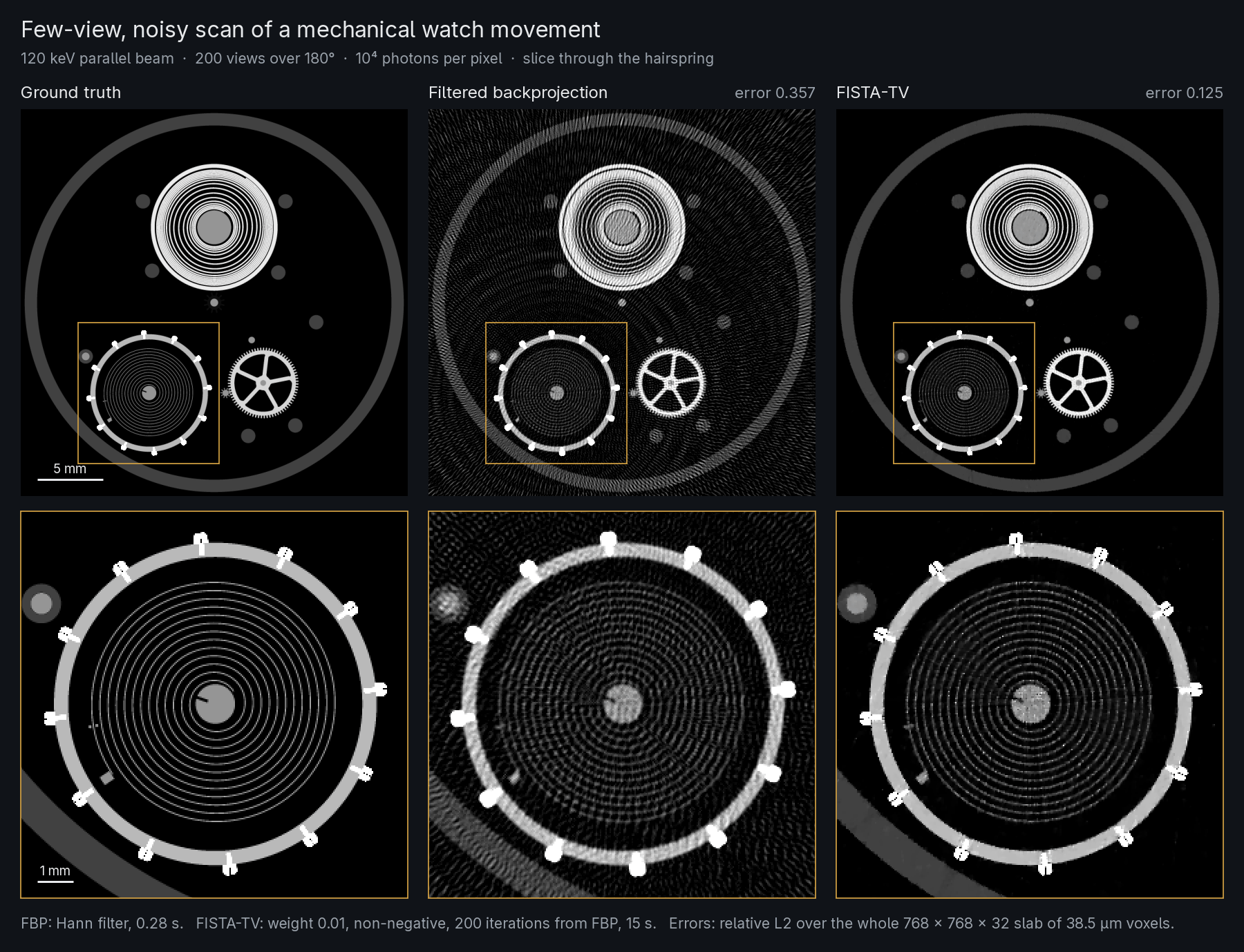
From 200 views with 10⁴ photons per pixel, filtered backprojection of a slab through the hairspring has relative error 0.357 against the exact voxel average of the meshes, and FISTA-TV 0.125, in 15 s. Reproduce the figure.
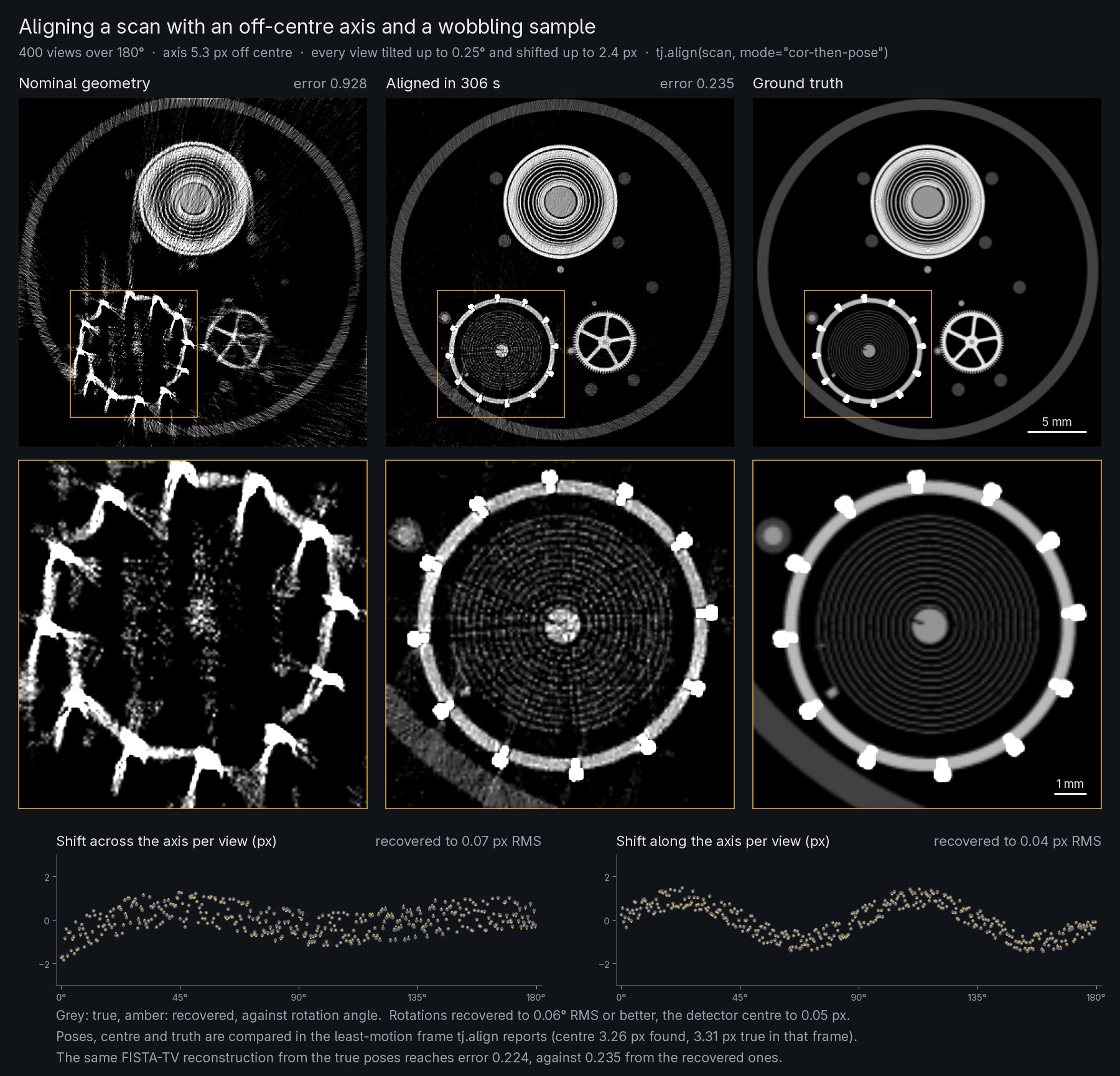
tomojax align and tj.align solve the volume and each view's pose together.
On a 400-view scan of the movement with its axis 5.3 px off centre and every
view tilted by up to 0.25° and shifted by up to 2.4 px, mode="cor-then-pose"
recovers the rotations to 0.06° RMS or better and the shifts to 0.07 px
RMS in 300 s, and the reconstruction error falls from 0.928 to 0.235. The same
reconstruction from the true poses reaches 0.224.
Poses and volume are compared with the truth after removing the rigid motion
the data cannot determine. Reproduce it.
First reconstruction
On Linux, install uv. For a published release, install the CPU wheel into a fresh environment:
uv venv --python 3.12
uv pip install --python .venv/bin/python "tomojax[cpu]"

.venv/bin/tomojax simulate -o synthetic.nxs --size 32 --n-views 60
.venv/bin/tomojax recon synthetic.nxs -o recon.nxs
.venv/bin/tomojax inspect recon.nxs --preview previews
No scan data or GPU is required. To try unreleased changes, first build and install a wheel instead of installing from the package index, then run the same three commands.
inspect describes the file, checks it and ends with Valid: yes. Open
previews/slice_x.png, slice_y.png, and slice_z.png, the volume's central
slices (projection.png is the central projection). recon.nxs contains the
projections, volume, and geometry metadata. The PNGs are display-scaled
previews; use the stored volume for quantitative analysis. This CLI example
automatically selects Fourier inversion for its axial parallel geometry.
Every command reads an input and writes -o OUTPUT, refusing to replace an
existing file without --force; tomojax <command> --help describes it, and
the CLI overview lists the commands.
For CUDA installation, wheel installation, and device checks, see installation. For your own scan, start with the quickstart.
Choose a workflow
| Task | Start here |
|---|---|
Load and correct an NXtomo, APS Data Exchange, Nikon .xtekct or TIFF scan, then reconstruct it | Quickstart |
| Supply measured geometry for parallel or laminography data, including TIFF stacks | Real scan guide |
| Import, calibrate and reconstruct a lab cone-beam CT scan, including multi-orbit scans | Lab cone-beam CT |
| Simulate data or use the Python API | Synthetic workflow, runnable examples |
| Correct per-view motion or the centre of rotation | Alignment guide (experimental; check the recovered geometry) |
| Reconstruct scans larger than the GPU, or use several GPUs | Large scans and several GPUs |
| Check supported models and limitations | Support matrix, known limitations |
Python
In Python, a Scan holds projections and their geometry, and every
operation returns a result that carries its geometry:
import tomojax as tj

scan = tj.load("scan.nxs")                        # or a Nikon .xtekct
recon = tj.reconstruct(scan)                      # choose from the geometry
recon = tj.reconstruct(scan, "cgls", iterations=50)
result = tj.align(scan, mode="cor-then-pose")     # result.scan carries the corrections
tj.save("recon.nxs", tj.reconstruct(result.scan))
The command-line options use the same names: the CGLS line is
tomojax recon scan.nxs -o recon.nxs --method cgls --iterations 50, and the
alignment tomojax align scan.nxs -o aligned.nxs --mode cor-then-pose.
Expert settings are a configuration of the method's own class from
tomojax.recon,
tj.reconstruct(scan, "fista", config=FistaConfig(regulariser="huber_tv")),
or the same fields in a TOML file given to --config. A long alignment can
save its progress and resume after an interruption:
tj.align(scan, checkpoint="align.ckpt"), or --checkpoint align.ckpt.
tj.Scan(projections, geometry) builds a scan from arrays, and
tj.project(geometry, volume) simulates one for any geometry. Volumes use
(x, y, z) and projections (view, v, u); detector and voxel spacings must
use the same physical length unit. The building blocks behind these are in
tomojax.recon, tomojax.alignment, tomojax.corrections,
tomojax.geometry, tomojax.io, tomojax.forward and tomojax.datasets.
Start with the complete example or
browse the documentation index.
Evidence
Measured speed, accuracy and memory against ASTRA and TIGRE, failed cases included, are in the measurements. Volumes larger than the GPU stream through it in slabs: SIRT of a whole Diamond I12 scan, 1801 views of 2160 × 2560 pixels into a 56.6 GB volume, ran on an 8 GB laptop GPU with 1.4 GB of GPU memory at 1.13 times the per-voxel time of a scan that fits (large scans).
Development and license
See CONTRIBUTING.md for environment setup, engineering conventions, tests, and package checks. Changes on this branch are recorded in the changelog.
TomoJAX is licensed under GPL-3.0-only.